It's been almost a year since I started using Gitlab CI, since the article about it (not counting that dedicated to PHPUnit tests), there have been quite a few changes. I'm taking the opportunity of a meetup where we presented with Inès Wallon our progress on this subject to summarise this progress.
Overview
In almost a year, I've added many tools to my project skeleton, even if some were already mentioned in the last article, I'll mention them again to have an exhaustive list at the time of writing.
In the future, I'll try to find opportunities to give more regular progress updates on developments made to have articles that are easier to read (and write :) ).
After that, it's a balancing act to find as many changes (especially taken individually) aren't interesting enough to warrant a dedicated article, plus I sometimes put something in place and come back to it because it's not quite perfected or ultimately useless. It's constantly evolving/improving.
Some tools are not yet ready for use with Drupal, others are not simple or were not simple to add, this will be detailed in the dedicated parts.
To break in these tools, I've set up dedicated branches:
- ci-tests: featuring code dedicated to making tests fail.
- ci-contrib: to run the tests on the modules I maintain. This provides more tools than drupalci currently offers. I still, for example, ignored the tests for the File Extractor module because it requires a rather special setup that is already managed on drupalci.
- ci-contrib-smile: ditto ci-contrib, to run tests on the modules I maintain via Smile.
- ci-tests-example: to provide an example of PHPUnit tests on existing project configuration.
And since last weekend, I've updated the architecture of my site in relation to all these changes so that I can take advantage of Gitlab CI and have a personal implementation case.
Improvements to CI
Courses
Previously with 2 stages, "build" and "tests", as more jobs were added to the "tests" stage it became badly distributed and unreadable, so I separated the tests into:
- security,
- code quality,
- tests.
To make a clear distinction between certain jobs depending on their purpose.
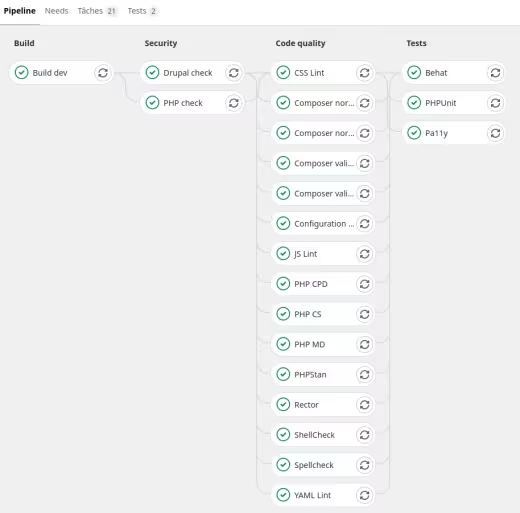
Status of my skeleton pipeline as of 3 March 2021.
Artifacts
At first I was using the cache functionality provided in Gitlab CI to pass build items from one stage to another. To prepare for future deployment management, I switched to the artefacts that allow you to download, browse the project build and are the basis of a reporting system in Gitlab CI.
Test preview
Gitlab CI manages a reporting system, many aspects are covered. Those of interest to us are:
- jUnit
- Code Quality: left out because:
- requires an export in "Code Climate" format that most of the tools used do not have, or requiring additional libraries,
- the results of this type of report only appear on Merge Requests, not on the detail of a pipeline. This would have meant having to define different jobs whether on a MR or not in order to have access to the results of the command if the analysis failed,
- it is only possible to have one job exporting a report of this type per pipeline, see the issue ….
- Performance: left out as Premium functionality (see also Sitespeed.io part).
This leaves us with the jUnit format.
I was able to find a bug from Gitlab.com, indeed some reports (PHP CS, PHPStan) were not working, this has since been resolved.
Although most tools have a jUnit export, I decided to use this type of report with only the actual test jobs, PHPUnit and Behat. Pa11y too if there was support for this type of report (it exists via a plugin, but for Pa11y, not Pa11y-this one that I use). For example, we have a difference with Inès's skeleton on this point, who has chosen to use jUnit reports for quality code jobs.
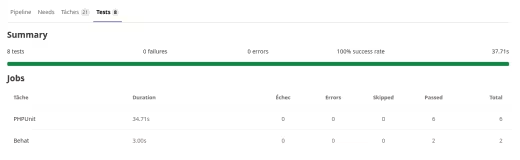
Example of a Gitlab CI test report when using jUnit report.
Upcoming improvements
Some jobs require the Drupal site to be installed, at the moment these are Configuration inspector, Behat and Pa11y.
To avoid having each job reinstall the site, I would have to add a build step with exporting a database dump and adapting the scripts to inject this dump directly.
- As the .gitlab-ci.yml file grows as functionality is added, I'll have to think about separating parts into dedicated files and making inclusions. Already done on the Inès skeleton for example.
- Modify the execution conditions of certain jobs so that I can launch programmed pipelines targeting security updates only (see next part).
IC tasks
Security scans
In the composer.json file (require-dev section), I use the "drupal-composer/drupal-security-advisories" and "roave/security-advisories" metapackages to prevent the addition of Drupal "projects" and PHP libraries that have a security update available. And running the "compose update" command will quickly show whether any security updates are available.
Only, I wanted to integrate this into the CI to ensure that it is run regularly and automatically (even a dormant project) and be notified when an update is available.
For the Drupal "projects" part, I was planning to make a Composer plugin to run the "compose update" command in dry-run mode and if the command failed, send an email. But in fact, the principle already existed, via the "Drush pm:security" command, which is precisely based on the "drupal-composer/drupal-security-advisories" metapackage.
Well, no dedicated emailing, and that's just as well, because managing emails is never easy.
For the PHP library part, the Sensiolabs Security Check service has been stopped for a few months, I also discovered the existence of the "drush pm:security-php" command that used this service and therefore reported that it was no longer working in the … issue. Having already implemented the replacement solution … I stuck with it.
This makes it possible to schedule a pipeline run every Wednesday evening and be notified when security updates are released on a particular project.
Compose
Apply the "composer validate" and "composer-normalize" commands to check the state of the composer.json files and the composer.lock file.
I was able to discover a limitation last weekend via usage on my site. Indeed, I manage the front libraries via Composer and the expected folder name for 2 libraries used by the Slick module is not the one obtained by default via Composer. Now I'm overloading the destination folder name in the installer-paths configuration and this overload must be placed after the generic rule which is opposed to alphabetical sorting.
For now I've reported the problem in the … issue, depending on the response, I'll patch the Slick module so that it accepts the default folders obtained via Composer.
Edit 1: I studied the code of the Slick module to make a patch so that it uses the default folder names of the downloaded libraries. It turns out that the module already has dynamic code for this. I was therefore able to remove this particular management of libraries in the composer.json.
Shellcheck
No changes since the last article.
PHP CS
No changes since last article.
PHP MD
I just added some rule exclusions in relation to too short method or variable names from hooks for example.
Note however the deactivation of the "MissingImport" detection, indeed PHP MD raised an alert on the use of a global class, example "\Exception", and required the use of a use even for this case. And then it's PHP CS that complains, so it's impossible to satisfy the 2.
Since PHP MD did not raise this alert in other cases where it was necessary for and where PHPCS detected the problem well for it, I preferred to disable in PHP MD.
Moreover this avoids standard coding problems on Drupal.org which is not equipped with PHP MD.
PHP CPD
No changes since the last article.
PHPStan
I used to use drupal-check, but following version issues with downloaded libraries and a discussion about whether or not to use the library in PHAR, I switched to PHPStan directly so I could configure the way I use the tool and it avoids a layer of abstraction.
I've added a few error exclusions mainly due to typing related to the use of the t() function / TranslatableMarkup object which work like strings, but typing-wise it's not good.
Besides that, problems detected in the code can be fixed, there's only the occasional addition of exclusions via a Phpstan comment for points untreatable because in code overloading Drupal core code or community modules.
Rector
A deprecated code detection tool that generates a fix for the code in question. Highlighted last year with community preparations for the move to Drupal 9.
In general no worries, but note an error that I have so far been unable to explain on the code of my site :
Fatal error: require(): Failed opening required 'app/core/modules/migrate/src/Plugin/MigrationInterface.php'
Use normally in the code of the module used to migrate content. I've excluded the classes in question for now. I'll have to report the bug if it doesn't already exist.
Edit 2: the issue has been created: …
Configuration Inspector
Basically, I had only made a Make command to facilitate analysis on the development environment. And once I'd managed a task (Behat) that required the site to be installed, I thought it could easily be put into Gitlab CI.
Configuration Inspector is a module that allows you to check that the configuration schema declared in the schema.yml files of Drupal extensions is respected by the active configuration.
The module provides a BO report, but more importantly a Drush command.
I still indicated that the job could fail because many Drupal community modules do not have their configuration schema declared or declared without error.
Cspell
This tool checks code and comments for typos.
I've overridden the Drupal core configuration so that I can specify project-specific word dictionaries.
At first as long as words specific to a project or modules, or certain files (such as a test PDF) are not excluded, there are a lot of errors, after that typos stand out well.
YAML Lint
Use of the "grasmash/yaml-cli" library which I used via a custom script because the command provided only takes a file as an argument, impossible to specify a path. Hence the creation of a script to find the YAML files in the folders to be analysed.
Stylelint
Linter for CSS files.
Use the kernel configuration file with only the .stylelintignore overload to specify project-specific files to ignore.
The script provides an option to the command to automatically correct the code.
ESLint
Linter for JS files.
I had a chance to chat with Theodore Biadala about using ES6 in Drupal core. There is precisely the initiative to improve the JS of the core in order, among other things, to be able to use ES6 more easily in community modules and specific code. At the moment, ES6 is only compiled for the kernel. So I've decided to stick with JS files, and use the ".eslintrc.legacy.json" configuration.
In the same way as almost a year ago, I encountered problems with the "eslint-config-prettier" plugin. We discovered that it was coming from an .eslintrc.json file that was managed via drupal-scaffold and taken into account because we were running the eslint command in the Drupal source folder to take into account the .eslintignore file located there. The .eslintrc.json file was taken into account despite the fact that the command options specified another configuration file. All we had to do was delete it and exclude it from the scaffolding.
For the moment, I haven't made a system to have an overloadable .eslintignore file in a project because the one provided by the kernel is sufficient for now.
The script provides an option to the command to automatically correct the code.
PHPUnit
No changes since the previous article on PHPUnit tests, apart from managing whether in a CI context to do a jUnit export of test results.
Behat
One of the most complex points to implement. The steps were as follows:
- Recover the Behat configuration and scripts I made 3 years ago to run Behat tests in order to adapt it to the changes that have since taken place in my skeleton and check that it works on a development environment,
- make sure you have a site installed when you run the pipeline. The script used for the Drupal installation worked almost immediately, the only issue was dynamically changing some variables used in the scripts and defining a dedicated Drush alias to Gitlab CI. Fortunately the source path is constant : /builds/namespace/project_name/
as the URL of the site differs from the development environment, it was necessary to be able to change this value in the Behat configuration, to do this I used the Behat profile system to precisely specify sets of parameters for it to take via a command option.
A difficult point was the drupal_root parameter where I used the fact that Behat takes into account a BEHAT_PARAMS environment variable (a bit like some PHPUnit variables) to generate this variable dynamically. With hindsight, as the path to the sources is ultimately constant whatever the pipeline, this could have been put directly in the Behat configuration file. At least the system for injecting dynamic variables into Behat is in place.
Extract from the Behat configuration file for declaring profiles:
docker-dev:
  extensions:
    DrupalMinkExtension:
      base_url: 'http://web'

gitlab-ci:
  extensions:
    Drupal\MinkExtension:
      base_url: 'http://localhost:8888'
Extract from the script variable management file for the dynamic generation of the BEHAT_PARAMS:
# Export BEHAT_PARAMS dynamically.
BEHAT_PARAMS=$(jq -n \
               --arg APP_PATH "$APP_PATH" \
               '{"extensions":{"DrupalDrupalExtension":{"drupal":{"drupal_root":$APP_PATH}}}}')
export BEHAT_PARAMS
I encountered complications with the concrete case of my site, but that will be the subject of a future article.
Pa11y
Pa11y and its CI version Pa11y-ci are accessibility testing tools. I had tested the tool and created Docker images to facilitate its use in 2019: see the dedicated article.
The steps for setting up the tests were:
- Take back these Docker images as unused, therefore requiring updates and review the documentation on use.
- Make sure you can use them on the development environment. This was done via the docker-compose.yml file to have a container that could reach the site via the service alias (but as a result no HTTPS URL compared to my stack).
- Make sure you can use it in Gitlab CI...:
- With Pa11y-ci no profile system like Behat, hence the need to have a configuration file specific to the Gitlab CI environment as the web alias wasn't going to work.
In a job, until now it was the PHP container that did the actions ("script" section). In the case of PHPUnit, it was always this same container that could drive the "chrome" container for Functional Javascript tests. With Pa11y-ci, the command can only be launched from this container, but it's impossible to change container because you have to launch the web server and install the site via the PHP container.
Hence the decision to modify the Docker image used in the CI to integrate Pa11y-CI directly.
And what a surprise to see that a standard Drupal doesn't pass the "WCAG2AA" standard because of the https://www.drupal.org/project/drupal/issues/1852090 issue, as soon as there are 2 forms on a page with each an "actions" section, we get the "Duplicate id attribute value "edit-actions" error.
Hence why I allowed the job to fail.
On my site that's a lot of contrast errors I'll have to look at.
Tools outside CI
Upgrade Status
The Upgrade Status module can be used to check that a Drupal 8 site is ready to be migrated to Drupal 9. Upgrade Status does not have to be used on Drupal 9, I have however left the Make command as I assume that when Drupal 10 is released, Upgrade Status will be for reuse at that time.
PHPCS Fixer
Added with a configuration relying on "drupol/phpcsfixer-configs-drupal", to add the standard coding overhead on strict type.
However, I found that the command doesn't detect files with an extension other than .php.
GrumPHP
Many tools are executed in the CI, there are also Make commands in order to facilitate their execution on the development environment and independently of the IDE used. But the sooner the developer is alerted to problems the better, so you might as well avoid having to wait for the results of a merge request and that's where GrumPHP comes in.
It's a PHP library for running a battery of pre-commit checks and checking the commit itself using Git hooks.
Practically, it only runs scans on the files that are going to be committed and not on the code as a whole.
Despite this, I haven't included every possible point that can be managed via GrumPHP, because I don't want to wait for a 3-minute PHPUnit test to prevent me from committing, so I've only included code quality and commit message verification tools.
To note :
- I didn't put PHP MD because it was impossible to specify a PHP MD configuration file for it,
- for PHP CS, ditto, impossible to specify a PHP CS configuration file for it, as I use standards with additional rules only, I listed the 2 standard coding sets provided by the Coder extension,
- GrumPHP embeds a JSON linter,
- the forbidden word list is very handy to avoid a dragging console.log,
- it's also possible to force a Git branch naming convention, but I haven't gotten that far.
At worst it's always possible to use the "--no-verify" option to avoid verification and the IC will intercept problems normally.
The next step will be integration directly into the IDE of tools to speed up problem resolution.
Psalm
I didn't find any configuration for Drupal, and instead found instead problems encountered by other people who have tried the tool on Drupal code.
As the workarounds are not yet very clear, I had decided not to include the tool, there are already enough PHP parsers. But following a discussion with Adrien Lucas about PHPStan and a Symfony deprecation impacting Drupal, I put it back but not present in the CI. Only there to be run to challenge a PHPStan result if needed.
Tools not integrated
For now anyway.
Twig lint
I wanted to integrate the … library, but it is no longer maintained and impossible to use twigcs directly because you need to be able to specify that you are in a Drupal context so that the linter can take into account the Twig specificities linked to Drupal.
While searching, I found that in Acquia BLT there was a functional integration for Drupal, only it was impossible to take that up simply in Shell script. Indeed, it's a whole set of PHP scripts based on Robo that were made in Acquia BLT and it's complicated to take over only a part of it.
It's complex, but I completely understand the approach, it allows whatever the tool is to manage its configuration in a centralised file for all the tools and at the same time to encapsulate the specifics of each tool so that they all behave and use in the same way.
For the moment I've left this point aside, as rewriting all the scripts made so far is not my priority :).
Sitespeed.io
After code quality, testing, accessibility, there was one aspect that lacked automation, performance !
There are many performance measurement tools that can be used in a CI and containerised. For example, Lighthouse CI or Sitespeed.io. The latter benefits from easier integration with Gitlab CI.
However, as the Gitlab CI performance report is a premium feature and as there is currently no deployment management via Gitlab CI, the question of the relevance of the results arises when it comes to response times, for example.
Points such as accessibility or redirect detections would have remained valid even if run on an uncontrolled environment.
So I only wanted to test the implementation on a development environment. But given that the Docker image is 2GB, I left this idea aside because if it's not used regularly, it's not much use.
I've documented manual usage in the relevant issue.
Cypress
Cypress is a JS end-to-end testing framework.
So far I've started looking into it and have seen presentations of a use with Drupal involving the module of the same name.
The module seems to provide some interesting benefits with, among other things :
- Drush integration to make Cypress easier to use,
- a caching of the Drupal installation to save time on test execution.
But this therefore requires NodeJS and Cypress to be installed on the same environment as PHP so that Drush can drive Cypress.
The first tests were not very conclusive :
- this would require numerous libraries to be added to the Docker images needed to run Cypress,
- some Cypress features such as Cypress Studio are not accessible, even though they provide a clear advantage over writing Behat tests or PHPUnit Javascript for example,
- there are already many official Cypress Docker images to run the desired browsers in the desired version, it would be a shame not to be able to use them.
The next time I work on using Cypress again, I'll therefore go for a native Cypress approach independent of Drupal instead.
Conclusion
That's a fair amount of change in the last year, and this article allows me to take a step back and look at how far we've come.
There will continue to be change, the roadmap is still publicly available and I've indicated the next points in the article.
What you need to remember :
- This is just one example of using Gitlab CI with Drupal.
- You have to take a step back from the tools, they're just tools. They're there to help, if a tool poses a problem you shouldn't force yourself to use it. Some of them, moreover, scan the same rules in different ways and can give mutually incompatible results.
- There are always things to improve, as practices and tools evolve, points left out, adaptations to be made to each use case.
Next step, a PHPUnit vs Behat article experimenting directly on my site.
Acknowledgements
Thanks to :
- Inès Wallon for the almost continuous exchanges and mutual help on this subject.
- Théodore Biadala for the discussion about the NodeJS tools in the Drupal core.
- Adrien Lucas for the discussion about PHPStan and Psalm.
- Bastien Rigon for feedback as I integrate new elements into my skeleton.
- Smile for allowing me to spend time on this.