I am regularly interested in the subject of automated tests on Drupal, at every major event there is at least one conference on the subject and articles on the subject are regular in the Drupal community.
Also last year, I was able to have a discussion on this subject with Benjamin Rambaud at Drupal Dev Days 2019 who showed me his example of a project with PHP Unit tests on specific code.
The PHP Unit tests on specific code will be the subject of a dedicated article.
I " took advantage " of the confinement to get serious about Gitlab CI, reading the documentation (just rehashing existing skeletons without understanding doesn't interest me) and embarking on setting up Gitlab CI on my Drupal project template. I'd had this in mind for a long time, so it was high time to get started.
The purpose of this article is to present the first steps I've taken. This allows me to take a step back and take stock, because as you'll see in the article, I'm asking myself a lot of questions at each stage and the project is far from over.
Why this migration to Gitlab.com ?
With the implementation of Gitlab CI on my project skeleton, I was going to need at least one new special CI Docker image.
In fact, my initial tests (PHPCS, Drupal-check, PHPMD) with my florenttorregrosa/drupal-php-dev:7.3-apache image were conclusive, but when it came to :
- run NodeJS commands for asset compilation or tools requiring NodeJS
- running commands with tools that don't belong on a development environment, only a CI environment,
that was going to be problematic.
My Dockerfile files to create my images being mainly located on the … repository, I had already done a cleanup step almost 2 years ago leaving them only on the main branch, 8.x, to have only one reference location.
But I felt like separating them from that repository and putting them in a dedicated repository, so that I could rebuild the images regularly without necessarily having to wait for a push to be made to the repository.
Wanting to schedule the image build, I first looked in the hub.docker.com backoffice to see what was possible. And there wasn't this option: you can't schedule image builds via hub.docker.com directly. At least not as a free user.
It would have been possible to script the triggering of builds using the hub.docker.com API, but I thought that would very quickly be a gas factory and especially where to store the access tokens securely.
If I'm going to get into Gitlab CI and rethink the way I build my images, I might as well build them via Gitlab CI too. I had a bit of a look at the Github Actions documentation before given that my Git repositories were on Github. It was moderately inspiring. I found that Gitlab CI was more transparent and flexible. Afterwards, I really looked at the Github Actions documentation very quickly.
Although it might have been interesting to learn how to use a CI other than Gitlab CI, I didn't want to spread myself too thin. There are loads of CI tools Travis, Circle, Gitlab, Jenkins, Github, etc., and my aim is not to know them all.
I wondered if in passing I was going to group together the only other image I had … that wasn't in the repository. I finally decided to separate the images into different repositories in order to have more flexibility. Even the images that depend on each other, drupal-php and drupal-php-dev, at first I wanted to leave them together so as not to have additional complexity to manage and in practice setting up a build trigger between images was simple and in the end it reduced complexity.
Since I was going to set up Gitlab CI on my Drupal skeleton, and even though it's possible with Gitlab to use Gitlab CI on a repository not hosted on Gitlab, I decided to repatriate the repository to Gitlab.com.
I've archived my Github repositories to reference only those on Gitlab.com.
Steps taken
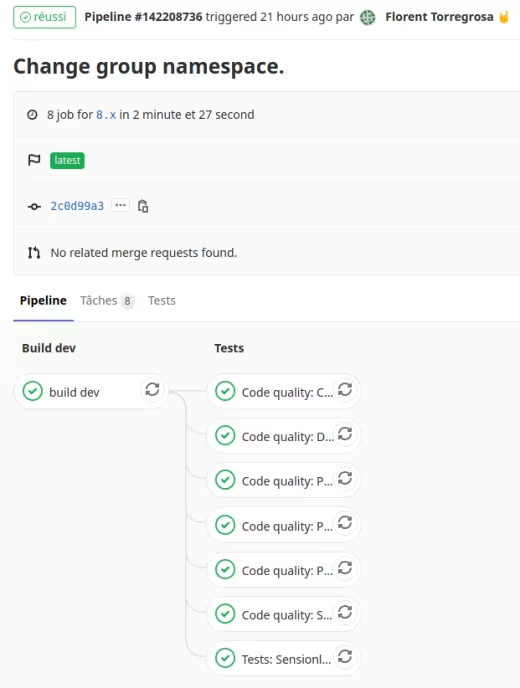
- Testing Docker image creation with Gitlab CI :
- I started by using my pa11y-ci image.
- This allowed me to check that even if an image is connected to the hub.docker.com automatic build, you could still send images built elsewhere.
- Making groups and subgroups, rather than having the repositories loose on my personal namespace :
- Separate varnish, drupal-php, drupal-php-dev images into separate repositories:
- use of token to trigger build of drupal-php-dev when drupal-php is built. This reverses the operation compared to building via hub.docker.com where it was the child image that reacted when the parent image was built.
- Disconnect hub.docker.com automatic builds and connection to Github.
- Fetch Github repositories from Gitlab.com.
- Creating an image ci-php:
- named taking my inspiration from https://github.com/ekino/docker-buildbox, so that later, if need be, there can be ci-node, ci-python, etc.
- based on Alpine, I started from drupal-php, drupal-php-dev images to merge them, remove what was only of interest for a development environment. With the switch to Alpine, I had to rely on the CLI variant of the official PHP image, as there is no PHP + Apache version for this distribution. Which is no bad thing, since I also have in the pipeline, to separate PHP and Apache from my drupal-php images.
- Cleaning up the project skeleton of Docker images.
- Implementing Gitlab CI on the skeleton :
- PHP CS : run with a configuration file. Up until now, I've been running PHP CS using only the standard Drupal and DrupalPractice coding. But here with the configuration file, it's much more convenient to specify the paths to scan and additional rules, such as forcing strict type.
- PHP MD : run with a configuration file. I couldn't find an official configuration for Drupal, so I used the one from https://gitlab.com/beram-drupal/drupal-ci with potentially slight tweaks.
- PHP CPD : too bad there's no configuration file like there is for PHP CS, so for now I've taken the setting from https://gitlab.com/mog33/gitlab-ci-drupal
- Drupal check : compared to https://gitlab.com/beram-drupal/drupal-ci, I didn't want to bother going through PHP Stan + a configuration file. It certainly allows more flexibility, but at the moment I have no use for it.
- Composer normalize : I discovered this tool when I looked at GrumPHP (see later in the article). Just great! I haven't so far found a Drupal standard in how to organise a Composer.json file and in fact don't need to, as this is based on the official Composer JSON schema https://getcomposer.org/schema.json. No need to spend time checking that the information in the composer.json is properly organised, sorted alphabetically, etc. If you're wondering about standard 2 or 4 indentation, the answer is in Drupal core https://git.drupalcode.org/project/drupal/-/blob/HEAD/.editorconfig.
- Sensionlabs Security Checker
- ShellCheck : no need to put it in the ci-php image as an ultra-light official image exists.
- Caching between Gitlab CI jobs.
- Adapting ci-php and drupal-php-dev images where necessary for adding tools.
- Correction of shell scripts in relation to ShellCheck implemented.
- Removed shell scripts to launch code analysis tools, plus some weren't working properly, to instead add commands to the Makefile.
- I'll see later, if I don't push the subject, to no longer have shell scripts and to pass everything through the Makefile.
Now, in addition to Gitlab CI initialized in the project skeleton, I have my images updated every month, on the 2nd day at noon UTC. By default Gitlab offers a monthly build on the first day of the month, I thought that if all monthly builds chose this option, it would be a bottleneck so I might as well avoid it. Images are also rebuilt during commit on their develop branch.
Other advantages of building images with Gitlab CI :
- there can be several builds in parallel, because in the free version, hub.docker.com only does one build at a time,
- the builds are faster than via hub.docker.com directly. Less than a minute or on the order of a minute to build all the images in a repository (https://gitlab.com/florenttorregrosa-docker/images/docker-ci-php/pipelines, https://gitlab.com/florenttorregrosa-docker/images/docker-varnish/pipelines).
On the skeleton, I have a branch with code created specifically to make the tests fail and a merge request dedicated to testing that the tools are actually doing their job: https://gitlab.com/florenttorregrosa-drupal/docker-drupal-project/-/merge_requests/14.
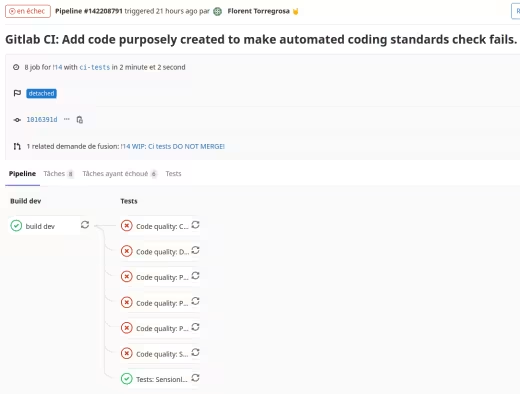
Pipeline fails on merge request dedicated to making tests fail.
Next steps
I've listed the items to be dealt with in tickets on https://gitlab.com/florenttorregrosa-drupal/docker-drupal-project.
The points rather related to skeleton and Gitlab CI :
Add PHP Unit :
tests.
- In relation to what's https://gitlab.com/beram-drupal/drupal-ci, I need to make some adaptations because since my repository serves as a template, I don't want to version Drupal configuration in it. But at the same time, I need to be able to have PHPUnit tests enabled, using a project's configuration to serve as a demo.
- Add PHP CS Fixer.
Add Behat :
tests.
- I had experimented with these almost 3 years ago, but never really used them. I need to run them with Gitlab CI so I can make sure the prerequisites, configuration and commands are up and running.
- Add CSS lint, SASS lint and other lint using Node JS.
- Add Eslint :
Not added yet because from what I've been able to see and try from the https://gitlab.com/mog33/gitlab-ci-drupal repository, it's based on the Drupal core configuration, which is a good thing for staying iso with its standards. But the kernel is designed to apply standards to " .es6.js " files. I would have liked to be able to scan "normal" JS files. Even using the kernel's .eslintrc.legacy.json configuration doesn't work as I'd like, because the kernel embeds Prettier which doesn't have to take the same configuration file into account and causes standard coding errors when there aren't supposed to be any. I'll have to look at this again, even if it means starting to make ES6 JS files too.
- Add Pa11y-ci :
- I'd looked into it, but to make sure I can use it, I need to integrate it into the IC directly.
- Add GrumPHP :
- I have not yet implemented GrumPHP on the skeleton. Compared to the article from which I drew inspiration https://www.famillewallon.com/blog/2019/08/15/presentation-de-grumphp, I chose not to use the vijaycs85/drupal-quality-checker package because it embeds dependencies that I don't want. And although the automatic " hook git " side of GrumPHP interests me, because I'd already tried to set it up more manually, I need to see how GrumPHP connects to the tools it runs. As explained later in this article, if the tools (PHP CS, PHP MD, etc.) are installed globally, will GrumPHP be able to use them? Similarly, there are some tasks I'd really like to have: lint JSON, lint YAML, Twig CS. I think I'll come back to GrumPHP another time as the git hooks are handy.
- Add more tools as we go along.
Points rather related to Docker :
- Improving the size of Docker images: while looking into the cache options for the docker build command, I came across https://docs.docker.com/develop/develop-images/dockerfile_best-practices/#use-multi-stage-builds.
- Run tests when building images to test them.
- Install development tools in Docker images directly :
- While looking through PHP tools documentation, I came across the Twitter thread https://twitter.com/s_bergmann/status/999635212723212288 which explains why development tools should not be managed with Composer's require-dev. I agree with the arguments set out in the Twitter thread, but for simplicity's sake I'm leaving the development tools in the require-dev for now and will see about putting them in my Docker images directly some other time.
Acknowledgements
Thank you very much to Ines Wallon and Benjamin Rambaud for answering my questions about their various repositories.
Links
- https://gitlab.com/florenttorregrosa-drupal/docker-drupal-project
- https://gitlab.com/florenttorregrosa-docker/images