I recently looked into setting up online memberships for the French-speaking Drupal association Drupal.fr. Here is a brief overview of the approaches explored.
Edit: this article presents solutions explored in response to a specific problem, and does not necessarily reflect the actual implementation on the drupalfr.org website. For example, corporate membership will likely be handled differently and with a different workflow.
Requirements
- Individual membership: €20
- Corporate membership: €30 × number of employee(s), capped at €2,000
Membership
Using the Membership Entity module and its Drupal Commerce integration Membership Entity Commerce.
The Membership Entity module allows you to define membership types with renewal periods, optional associated taxonomy, and other features.
In principle, this is exactly what is needed — except that I was unable to get the Drupal Commerce integration working. Its integration adds a product type and an order item type. However, the product type does not include the commerce_price field that is automatically added when creating new product types via the interface, for example.
As a result, Drupal Commerce fails to function and errors occur.
EDIT: After another test with the latest development version of the Membership Entity Commerce module, the product type does include the commerce_price field and everything works correctly.
Registration
Using the Registration module and its Drupal Commerce integration Commerce Registration (not to be confused with Registration Commerce).
Registration defines a new entity type — registrations — which work with "registration reference" field types. Once a registration reference field is attached to an entity, it adds a form with the fields of the referenced registration type when the entity is viewed. Very handy for event sign-ups, for example.
However, I did not pursue this approach further as I feel the module's use case is really events or content-linked registrations, which is not quite what is needed here.
Drupal Commerce + Rules
Using Drupal Commerce, Rules, and Commerce Customizable Products.
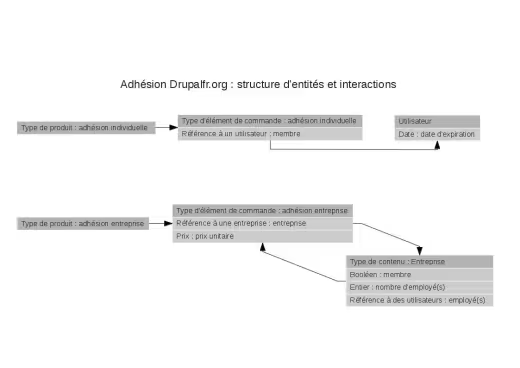
Schema of the entity structure for membership management on drupalfr.org.
The structure of the various entities is shown in the diagram. The Commerce Customizable Products module makes it easy to create new order item types from the back office. The add-to-cart widget options can be configured to offer either an individual membership order item type or a corporate membership order item type.
Rules must then be used to add the business logic we want to execute. Some parts of the logic can or must be extracted into components to promote reusability or out of necessity — for example, the need to mix actions and conditions in a specific order.
Individual membership
Rule:
- Event: end of the checkout process
- Condition (optional): the order contains individual memberships, tested via product types or via order item types (second option not tested)
- Action:
- loop over the order items:
- for each order item of type individual membership:
- grant the member role to the user referenced via the field in the order item,
- set the value of their membership end date to the current date + 1 year
- for each order item of type individual membership:
- loop over the order items:
Corporate membership
Same principle as individual membership, except that the difficulty here lies in the price calculation. A rule for the end of the checkout process nearly identical to the one for individual membership — I will not detail it again.
A rule for price calculation:
- Event: Calculating the sell price of a product
- Conditions:
- the order item is of type corporate membership (which gives access to the second condition),
- the entity referenced by the entity reference field of the order item type (see diagram) has a number of employee(s) field (which gives access to the number of employee(s) field in the calculation),
- Actions:
- Multiply the unit price by: the value of the number of employee(s) field,
- If the price exceeds €2,000:
- Set the price to a fixed amount: €2,000
The part in red needs to be extracted into a Rules component, because a condition check is required while we are already inside the actions section of the corporate membership price calculation rule. This component will be a Rule that takes the order item as a parameter.
Conclusion
Another possible approach worth exploring would be to use modules that hook into the Payment module, but having not yet had the opportunity to use that module and preferring Drupal Commerce, I naturally gravitated towards the latter.
Using "standard" modules, it is therefore possible to achieve the desired result through the graphical interface, which ensures easy maintainability. It also avoids relying on rarely-used modules and the risk of those modules being slow to migrate to Drupal 8.